Yüksek Erişilebilirlik Çözümleri, Bölüm 1
Yazarlar: Aybars Hallik, Doğan Kemal Cenan
Yüksek Erişilebilirlik Çözümlerine odaklanacak yeni blog serimize hoşgeldiniz.
Serinin ilk bölümünde “EnterpriseDB Failover Manager nedir? Nasıl Kurulur?” konusuna odaklanacak, EnterpriseDB’nin yüksek erişilebilirlik aracı olan EnterpriseDB Failover Manager (EFM) ile Postgres topluluğu tarafından geliştirilen yük dengeleme, bağlantı havuzlama gibi birçok özellik sunan pgpool aracının entegrasyonunu anlatacağız.
Replikasyon Nedir?
Replikasyon, ana veritabanından bir veya daha fazla yedek veritabanına veri kopyalama işlemidir. Replikasyonda ana veritabanı okuma-yazmadan sorumlu, yedek veritabanı ise sadece okumadan sorumlu olur.
Bu yazımızda “primary” ya da “master” veritabanı ifadelerini “ana veritabanı” olarak, “secondary” ya da “standby” veritabanı ifadelerini ise “yedek veritabanı” olarak kullanacağız.
EnterpriseDB Failover Manager Nedir?
EFM yüksek erişilebilirlik modülü, ana veritabanında yazılımsal ve/veya donanımsal nedenlerden dolayı oluşabilecek sorunlarda otomatik olarak yedek veritabanlarından birini ana veritabanı haline getiren yani “Promote” işlemini gerçekleştiren ve EnterpriseDB tarafından geliştirilmiş bir araçtır.
EFM aracının işlevi ve nasıl yükleneceği hakkında bu belgede vereceğimiz bilgiler PostgreSQL ve EDB Postgres Advanced Server (EPAS) veritabanlarının 9.6 ve sonraki sürümleri için geçerlidir.
Tipik EFM kümesi elemanları, aşağıda belirtilen bileşenlerden oluşur.
- Ana düğüm (node): Replikasyon yapısındaki ana veritabanı sunucusudur.
- Yedek düğüm: Yedek düğüm, ana düğüm ile arasında streaming replikasyon bulunan veritabanı sunucusudur.
- Tanık düğüm: Felaket senaryosu sonrasında, iki ya da daha fazla düğüm için belirlenen yeni görev tanımlarına ve durumlarına tanıklık eder. Eğer küme üç veya daha fazla düğüm içeriyorsa (Kümede bulunan düğüm toplamının tek sayı olması koşuluyla), kümede ayrıca bir tanık düğümüne ihtiyaç yoktur. Zira düğümlerden biri tanıklık görevini yerine getirebilir. Ancak veritabanı içeren üçüncü bir küme üyesi düğüm yoksa tanık düğümü eklenmelidir. Bununla birlikte küme birden çok tanık düğümü de içerebilir (Yine toplam düğüm sayısının tek sayı olması koşuluyla).
Normalde, küme terimi birden çok veritabanını yöneten tek bir PostgreSQL kurulumunu tanımlar. Ancak bu yazı serisinde kullanılan küme terimi EFM kümesini ifade edecektir.
EFM kümesi, bulutta veya geleneksel ağdaki sunucularda bulunabilir. Bire bir – bire çok iletişimi sağlamak için yazılmış olan JGroups kütüphanesi aracılığıyla iletişimi sağlar. Bu küme ana EFM ajanından, bir veya birden fazla yedek EFM ajanından ve isteğe bağlı olarak tanık EFM ajanından oluşabilir.
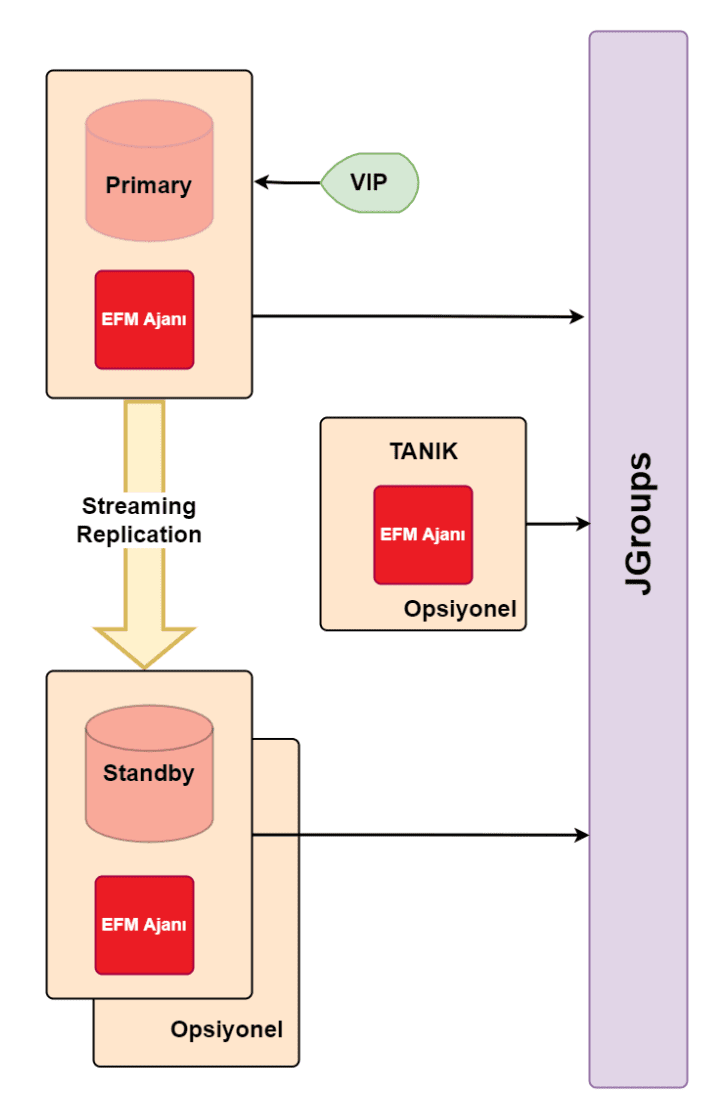
Yukarıdaki şekilde, Sanal IP adresi kullanan bir EFM kümesi gösterilmektedir. Sanal IP adresi, EFM kümesine gelen tüm isteklerin tek bir IP adresine gelerek dağıtımının buradan yapılmasını sağlar. Eğer veritabanları kümeye online olarak eklenip çıkarıldıkça yük dengeleyiciye bu değişiklikler haber verilebiliyorsa yük dengeleyici bir yazılım da sanal IP adresi işlevini üstlenebilir. Biz yük dengeleme aracı olarak pgpool kullanacağız. Sanal IP’yi yönetme işini pgpool’a bırakarak, kümeye veritabanı eklendikçe ya da kümeden veritabanı çıkarıldıkça EFM’ye haber vermek için de EFM tarafından sağlanan konfigürasyon dosyasını düzenleyerek, pgpool- EFM entegrasyonu nasıl yapıldığını göstereceğiz.
Tanık dışında herhangi bir EFM ajanı başlatıldığında, ajan veritabanına bağlanır ve durumunu kontrol eder.
- Veritabanına ulaşamazsa, IDLE olarak başlar.
- Veritabanı kurtarma (Recovery) işleminde ise, ajanın düğümündeki veritabanı, yedek veritabanı rolünü üstlenir.
- Veritabanı kurtarma işleminde değilse, ajanın düğümündeki veritabanı, ana veritabanı rolünü üstlenir.
Yük devretme yani “Failover” durumunda, EFM, ana veritabanı olarak atanan yedek sunucunun kümedeki en güncel yedek sunucusu olduğuna emin olur. Buna karşın ana düğüm ve yedek düğüm eş durumda yani “sync” değilse EFM promote işlemini otomatik olarak gerçekleştirmez.
EnterpriseDB Failover Manager Gereksinimleri Nelerdir?
EFM kümesini yapılandırmadan önce, sistemin aşağıdaki gereksinimleri karşılıyor olması gerekmektedir.
- Java 1.8 (veya sonrası) Kurulumu
- EFM’yi kullanmadan önce, Java’yı yüklemiş olmamız gerekmektedir (1.8 sürümü veya sonrası).
- EFM, OpenJDK ile test edilmiştir ve belirtilen sürümün yüklenmesi tavsiye edilmektedir.
- Java kurulumu için talimatlar kullanılan platformlara özeldir.
- SMTP Sunucusu Ayarlanması (İsteğe bağlı)
- EFM kullanılırken kullanıcı tanımlı komut dosyası, e-posta veya her ikisi ile tarafından bildirim alma seçilebilir.
- Eğer bu yöntemlerden biri kullanılacaksa SMTP sunucusunun aktif olması gerekmektedir.
- Streaming Replikasyon Konfigürasyonu
- EFM, ana ve yedek düğümleri arasında PostgreSQL streaming replikasyonunun (SR) yapılandırılmış olması gerekmektedir.
- EFM diğer replikasyon türlerini desteklemez.
- pg_hba.conf dosyasının düzenlenmesi
- ana düğüm ve yedek düğümlerdeki pg_hba.conf dosyaları kümedeki tüm düğümlerin birbirleriyle iletişimine izin verilecek şekilde ayarlanmalıdır.
- Aşağıda, ana düğümdeki pg_hba.conf dosyasında bulunması gereken satırlara bir örnek gösterilmektedir.
# kendisine erişim için host veritabani_adi efm 127.0.0.1/32 md5 # yedek sunucusuna erişim için host veritabani_adi efm 192.168.1.1/32 md5 # tanık sunucusuna erişim için host veritabani_adi efm 192.168.1.2/32 md5 |
|---|
- pg_hba.conf dosyası değiştirildikten sonra değişikliklerin aktif olması için sistemin yeniden yüklenmesi (pg_ctl reload veya “select pg_reload_conf(); ”) gerekmektedir.
- Güvenlik duvarları arasındaki iletişimin sağlanması
- EFM düğümlerindeki Linux güvenlik duvarları etkinse, güvenlik duvarı konfigürasyonlarına gerekli izinlerin verildiği kurallar eklenmelidir.
- Aşağıdaki komut 7800 numaralı portu açar. EFM, konfigürasyon dosyasında belirtilen port numarası ile bağlantıyı sağlar. Eğer güvenlik duvarları aktif değilse bu işleme gerek yoktur.
iptables -I INPUT -p tcp --dport 7800 -j ACCEPT /sbin/service iptables save |
|---|
- Veritabanı kullanıcısının gerekli yetkilere sahip olması
- efm.properties dosyasında db.user parametresinde belirtilen veritabanı kullanıcısı,
- pg_current_wal_lsn()
- pg_last_wal_replay_lsn()
- pg_wal_replay_resume()
- pg_wal_replay_pause()
- efm.properties dosyasında db.user parametresinde belirtilen veritabanı kullanıcısı,
fonksiyonlarını çağırabilmek için yeterli veritabanı yetkilerine sahip olmalıdır.
- reconfigure.num.sync veya reconfigure.sync.primary parametreleri ‘true’ olarak ayarlanmış ise:
- Sürüm 9.6 için db.user parametresinde belirtilen kullanıcı superuser olmalıdır.
- 9.6 sürümünden sonraki sürümler için, belirtilen veritabanı kullanıcısı pg_read_all_stats yetkisine ve pg_reload_conf()’u çalıştırmak için izne sahip olmalıdır.
- Ayrıca belirtilen kullanıcı, konfigürasyon değerlerini okuma yetkisine sahip olmalıdır. Veritabanında yetkili kullanıcı GRANT komutunu kullanarak gerekli izinleri kullanıcıya sağlayabilir.
GRANT pg_read_all_settings TO <user_name>; |
|---|
EnterpriseDB Failover Manager Nasıl Kurulur?
EFM kurulumu, root kullanıcısı tarafından yapılmalıdır. Kurulum sırasında, enterprisedb (EPAS superuser) veya postgres (PostgreSQL superuser) kullanıcısının yetkili olduğu veritabanları (cluster) için EFM servisini denetleyen ve komut dosyalarını kullanma yetkisine sahip efm isimli bir kullanıcı kurulum sırasında oluşturulur. CentOS 7 için kurulum adımları aşağıdaki gibidir.
1. Repo konfigürasyon dosyalarını oluşturmak için, superuser yetkisi olması gereklidir. Ardından aşağıdaki komut çalıştırılır.
yum -y install https://yum.enterprisedb.com/edbrepos/edb-repo-latest.noarch.rpm |
|---|
2. Birinci adımdaki kurulum sonrasında /etc/yum.repos.d dizini altında edb.repo dosyası oluşacaktır. Bu dosyadaki USERNAME ve PASSWORD bilgileri EnterpriseDB’nin sitesinden alınmış olan kullanıcı adı ve parola bilgileriyle değiştirilir. Bu işlem, dosya herhangi bir editör ile açılarak yapılabileceği gibi
sed -i "s@<username>:<password>@USERNAME:PASSWORD@" /etc/yum.repos.d/edb.repo |
|---|
komutunu USERNAME PASSWORD kısımları EDB’den edinilen bilgiler ile değiştirip çalıştırarak da yapılabilir.
3. EPEL reposu kurulumu yapılır.
yum -y install epel-release |
|---|
4. EFM paketinin kurulumu yapılır. Bu kurulum esnasında hata alınmaması için 2. adımda belirtilen değişikliklerin edb.repo dosyasında doğru bir şekilde gerçekleştirilmiş olması gerekir.
yum -y install edb-efm44 |
|---|
5. Kurulum sonrasında dosyalar aşağıda belirtilen dizinlerde oluşacaktır.
- Çalıştırılabilir dosyalar
- /usr/edb/efm-4.4/bin
- Kütüphaneler
- /usr/edb/efm-4.4/lib
- Konfigürasyon dosyaları
- /etc/edb/efm-4.4
- Loglar
- /var/log/efm-4.4
- Çalıştırılabilir dosyalar
6. Kurulum sonrasında her bir düğüm için
- efm.properties dosyası düzenlenir.
- efm.nodes dosyası düzenlenir.
- Eğer Sanal IP adresi ve kod parçacığı efm.properties dosyasında tanımlanmışsa, yapılandırılması ve test işlemleri gerçekleştirilmelidir.
- Kümenin her bir düğümdeki EFM ajanları başlatılır.
Bu işlemlerin detayını öğrenmek için bir sonraki blog yazımızı bekleyin.
Bu sırada EnterpriseDB hakkında daha fazla bilgi almak için tıklayın.