Sanallaştırma Nedir?
Sanallaştırma, mevcut bulunan fiziksel donanımın sanal makineler (virtual machines) yardımıyla çok daha verimli kullanılabilmesini sağlayan, çeşitli yazılım ve donanım bağımlılıklarını ortadan kaldıran ve bu sayede işi yürütme ve geliştirme maliyetlerinde büyük tasarruflar sağlayan bir yazılım çözümüdür.
Bir çok farklı kullanımı alanı vardır.
- Sunucu sanallaştırma (Server Virtualization)
- Uygulama sanallaştırma (Application Virtualization)
- Masaüstü sanallaştırma (Desktop Virtualization)
Sanallaştırmanın Avantajları
Sanallaştırma ile, sistem kaynaklarının yüksek verimle kullanır, aynı donanım üzerinde farklı işletim sistemlerini kullanabilir, ihtiyaç anında çok hızlı şekilde yeni sunucu oluşturabilir, kolaylıkla yedekleme yapar ve yedekten dönersiniz. Sanal makinelerin bileşenleri tüm işletim sistemlerinde kolaylıkla tanınacak şekilde düzenlenmiştir bu sayede donanım uyum sorunlarından kurtulursunuz. Bu imkanlarla donanım maliyetlerinde %50 ye varan azalma sağlar, operasyonel kurulum ve bakım maliyetleri %80 e varan oranda azaltırsınız.
Sanallaştırmayı yöntem olarak 3 ana başlık altında toplayabiliriz.
1. Yazılım tarafından sanallaştırma
Kurulu bir işletim sistemi üzerine bir sanallaştırma yazılımı kurularak yapılır.
- vmware workstation
- Oracle virtualbox
- vmware player
- Microsoft Virtual PC
2. Donanımsal (donanıma yakın seviyede) sanallaştırma
Sunucuya sanallaştırma için özelleştirilmiş işletim sistemi kurularak yapılır.
- vmware ESXi
- XEN
- Microsoft Hyper-V
- Proxmox (kvm, lxc)
3. Kap sanallaştırma
Kap (container) fiziksel bir sunucunun donanımının mantıksal olarak bölümlenmesi sonucu ortaya çıkan her sunucuya verilen genel isimdir. Sanal sunucuların kullandığı kaynaklar aynıdır ve sunucular birbirinden bağımsız olarak yönetilir. Sanal sunuculara tahsis edilen sunucu kaynakları (ram,işlemci) sanal sunucular tarafından kullanılmadığında, başka bir sunucu tarafından kullanabilir. Özetle paylaşımlı bir yapıdır.
- LXC
- Docker
Yazılımla Sanallaştırmada Katmanlar
Yazılımla sanallaştırma yapılıyorsa donanım kaynağının üzerinde bir ana işletim sistemi kuruludur. Sanallaştırma yazılımı bu ana işletim sistemi üzerine kurulduktan sonra bu yazılımın içinde sanal sunucular oluşturularak çalışılır.
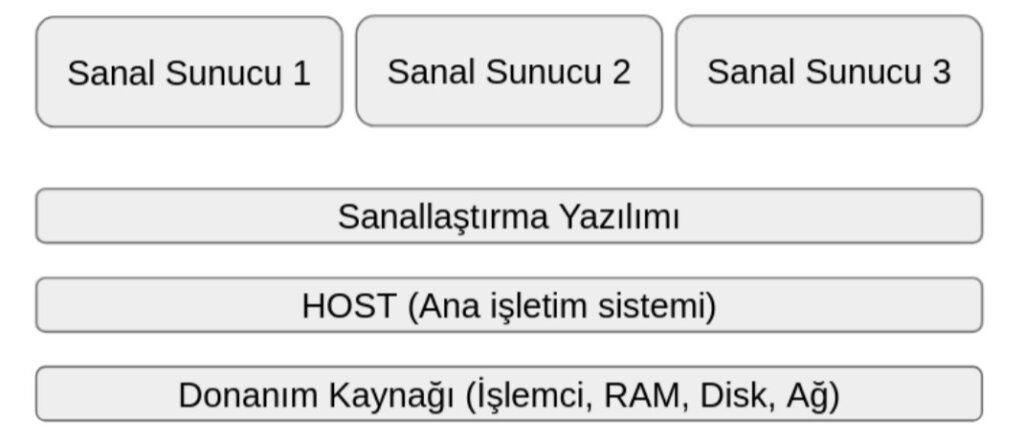
Ana işletim sisteminde oluşacak bir sıkıntı dolaylı olarak sanal sunucuları da etkileyecektir. Yazılımla sanallaştırma daha çok kişisel kullanım amaçlı kullanılan bir yöntemdir. Kişisel bilgisayarınıza vmware workstation veya virtualbox kurup daha sonra bu yapının içinde ihtiyacınız olan küçük sanal sunucular oluşturabilirsiniz. Bu ünitede ilerleyen slaytlarda bu yazılımların kurulumu ve kullanımı işlenecektir.
Donanımsal Sanallaştırma da Katmanlar
Yazılımla sanallaştırmanın dezavantajları ndan korunmak ve birden çok donanım kaynağını bir havuzda birleştirerek bir bulut yapısı oluşturmak istediğimizde donanımsal sanallaştırma çözümlerini kullanırız. Bu uygulamada sanallaştırma için özelleştirilmiş işletim sistemi (xen, vmware esxi, proxmox) donanım kaynaklarına kurulur bu kaynaklar tek havuzda birleştirilir.
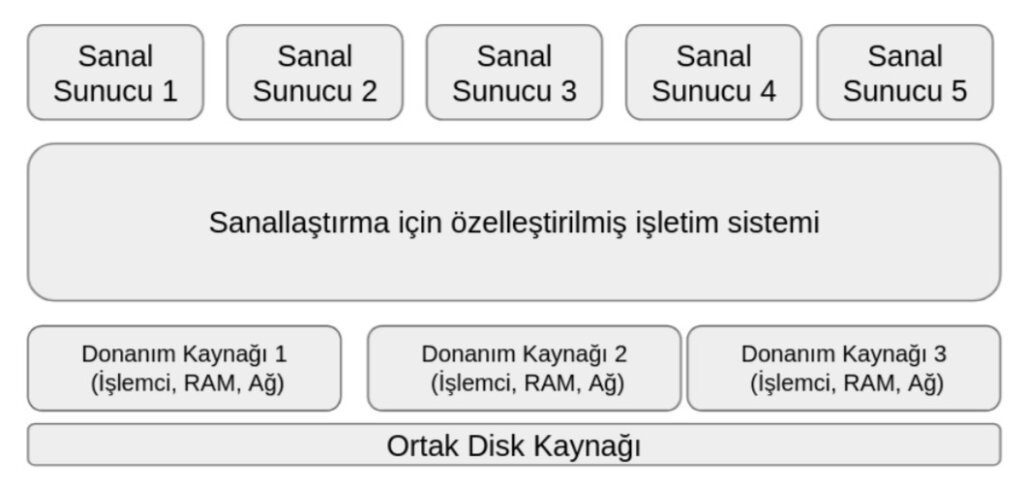
Sanal makineler bu havuz içinde oluşturulur. Bu yapının en önemli avantajı donanım kaynaklarını ölçekleyebilmenizidir. Sanal sunucunun fiziken hangi donanım kaynağı üzerinde bulunduğunun bir önemi yoktur.
Yapı tek bir bilişim sistemi olarak hizmet verir. Bi donanım arızası durumunda ilgili donanım kaynağını yapıdan ayırıp gerekli düzenlemeleri yaptıktan sonra yapıya yeniden dahil edebilirsiniz.Sanal makineler bu havuz içinde oluşturulur. Bu yapının en önemli avantajı donanım kaynaklarını ölçekleyebilmenizidir. Sanal sunucunun fiziken hangi donanım kaynağı üzerinde bulunduğunun bir önemi yoktur. Yapı tek bir bilişim sistemi olarak hizmet verir. Bi donanım arızası durumunda ilgili donanım kaynağını yapıdan ayırıp gerekli düzenlemeleri yaptıktan sonra yapıya yeniden dahil edebilirsiniz.
Kap (Container) Sanallaştırma
Artıları
- Kaynak kontrolü kernel tarafından sağlandığı için kullanılmayan kaynaklar diğer kaplar arasında paylaştırılabilir.
- Kaplar imaj yerine dosya seviyesinde olduğundan kolayca yedeklenir ve taşınabilir.
- Son kullanıcı açısından bakıldığında kap içinde çalışan işletim sisteminin fiziksel kurulumdan hemen hemen farkı yoktur.
- Fiziksel kurulumda çalışan çoğu yazılım kap içine kurulduğunda da çalışabilir.
Eksileri
- Ortak kernel ve ortak modüller ile çalışılır.
- Tüm kaplar Linux olmak zorundadır.
- Mekanizma olarak donanım sanallaştırması yerine izolasyon kullanılır.
- Ağ yönetimi izolasyon temellidir. (Konteyner ler kendi ağ, yönlendirme ve paket filtreleme mekanizmalarını kullanamazlar)
Tam sanallaştırma
Artıları
- Kaynaklar sanal sunuculara dedike edilir.
- Sanal sunucular imaj dosya seviyesinde olduğundan kolayca yedeklenilir ve taşınabilir.
- İşlemci ve hafıza bağımlı servis yazılımları açısından bakıldığında tam sanallaştırma yapılmış sanal sunucu kap sanallaştırmaya göre çok daha performanslı çalışır.
- Sanal sunucular windows veya linux olabilir.
- Fiziksel kurulumda çalışan hemen her yazılım dedike sanal sunucu içine kurulduğunda da çalışabilir. (donanımsal kilit kullanan yazılımlar hariç)
- Sanal sunucular arasında ağlar oluşturulabilir. Her bir sanal sunucu kendi paket filtreleme mekanizmasını kullanabilir.
Eksileri
- Kaynaklar sanal sunuculara dedike edildiği için kullanılmayan kaynak diğer sunuculara kullandırılamaz.
Sunucu Sanallaştırmada Temel Kavramlar
VPS (Virtual Private Server) fiziksel bir sunucunun donanımının mantıksal olarak bölümlenmesi sonucu ortaya çıkan her sunucuya verilen genel isimdir. Sanal sunucuların kullandığı kaynaklar aynıdır ve sunucular birbirinden bağımsız olarak yönetilir. Sanal sunuculara tahsis edilen sunucu kaynakları (ram,işlemci) sanal sunucular tarafından kullanılmadığında, başka bir sunucu tarafından kullanabilir. Özetle paylaşımlı bir yapıdır.
VDS (Virtual Dedicated Server) olarak bilinen paylaşımsız sanal sunucular; fiziksel sunucu üzerinde kaynakların paylaştırılması şeklinde değil, kaynakların doğrudan donanımsal olarak paylaştırılması şeklinde oluşturulur lar. Yani bir sunucuya tahsis edilen sunucu kaynakları kullanılmadığında, başka bir sunucu bu kaynakları kullanamaz.
Sanallaştırmada Kullanılan Çözümler
Kaynaklarını bir havuzdan paylaşımlı olarak kullanan linux sanal sunucular oluşturmak için OpenVZ veya LXC kullanabilirsiniz. Kaynakları sanallaştırma platformu tarafından dedike edilmiş windows veya Linux sanal sunucular oluşturmak için ücretli yazılımlardan vmware ESXİ, XEN veya microsoft Hyper-V kullanabilirsiniz. Açık kaynak kodlu çözüm olarak KVM veya virtualbox kullanılabilir. Proxmox hem KVM hem LXC teknolojilerini barındıran açık kaynaklı bir çözümdür.
- VPS – Virtual Private Server
- Linux VPS (OpenVZ, LXC, Docker)
- VDS – Virtual Dedicated Server
- Ücretli
- vmware ESXi
- XEN
- Hyper-V
- Açık kaynak kodlu
- KVM
- virtualbox
- Ücretli
KVM – Kernel Virtual Machine: açık kaynak kodlu bir tam sanallaştırma çözümü

KVM açık kaynak kodlu bir tam sanallaştırma çözümüdür. KVM ile sanallaştırma kernel seviyesine inmiştir. KVM, C dili ile geliştirilmiştir. Yazılımla sanallaştırma çözümlerinin pek çok konuda ana işletim sistemine muhtaç olmasından dolayı, KVM ihtiyaç üzerine ortaya çıkmıştır. KVM, Linux çekirdeğinin bir parçası olan modülü ve userspace araçlarından oluşur.
virt-tools ile komut satırından, virt-manager ile grafik arayüzü ile yönetilebilmektedir. Bir tam sanallaştırma çözümünde olması gereken tüm yetenekleri barındırmaktadır. KVM Linux çekirdeğinde tam sanallaştırma yapmak için gerekli çekirdek sistemdir. Çekirdek tarafında KVM yi kullanan bir çok sanallaştırma çözümü buluyor. qemu , libvirt
KVM Temini ve Kurulumu
Kaynak kodundan kurulabileceği gibi Linux dağıtımlarının repository lerinde paketleri bulunduğundan kolaylıkla kurulur.
| Debian | apt-get install qemu-kvm libvirt-bin virt-manager |
| Centos / Redhat | yum install kvm libvirt python-virtinst qemu-kvm bridge-utils |
Kap (container) temelli özgür sanallaştırma çözümleri :
Özgür KAP sanallaştırma çözümlerinden başlıcaları Linux Vserver, OpenVZ, LXC (Linux Containers) olarak sayılabilir. Docker başlangıçta LXC yapısını kullansada daha sonra kendi yapısını oluşturmuştur.
Proxmox VE – Açık kaynak sunucu sanallaştırma çözümü
 Proxmox hem KVM hem LXC teknolojilerini barındıran açık kaynaklı bir çözümdür. Açık kaynak kodludur. Desteği ücretlidir. Debian Linux tabanlı ayrı bir dağıtımdır.
PROXMOX ile aynı sunucu üzerinde Kernel tabanlı sanal makine (KVM) ve konteyner tabanlı sanal makine (LXC) oluşturmak mümkündür. python, C, perl, PHP dilleri ile geliştirilmiştir. Komut satırından ve web arayüzünden yönetilebilmektedir. web arayüzü Türkçe olabilmektedir. Bu sayede aynı sistem üzerinde linux VPS ler ile birlikte windows veya linux VDS ler oluşturabilirsiniz.
Proxmox VE Temini ve kurulumu
Proxmox kurulum ISO dosyası https://www.proxmox.com/en/downloads
adresinden temin edilebilir.